



Knowledge Base
DigiCert transitioning multipurpose G2 and G3 roots to dedicated TLS root hierarchies
Google Chrome Root Program requirements
The Google Chrome Root Program requires Certificate Authorities (CAs) to use dedicated TLS root hierarchies for issuing public TLS certificates. To enhance digital trust and comply with the Google Chrome Root Program requirement, DigiCert is transitioning our DigiCert Global Root G2 and DigiCert Global Root G3 roots to single-purpose root hierarchies dedicated to issuing public RSA and ECC TLS end-entity certificates. Learn more about Google Chrome’s root program requirements.
Items covered in this article
- What is DigiCert doing to transition these G2 and G3 roots to single-purpose root hierarchies?
- What must I do to prepare for the revocation of the G2 and G3 ICA certificates?
- What must I do to prepare for the revocation of the G5 cross-signed root certificates?
- Additional resources
- Need help?
What is DigiCert doing to transition these G2 and G3 roots to single-purpose root hierarchies?
DigiCert will revoke some G2 and G3 ICA certificates
On May 15, 2026, DigiCert will revoke specific G2 and G3 intermediate CA (ICA) certificates. We will not revoke the end-entity certificates issued from these ICA certificates; they will remain active. What you do with these certificates depends on their use and whether you still need them. More details are below.
If the ICA certificate in the trust chain of an end-entity certificate is revoked, the end-entity certificate is treated as not trusted or invalid. For example, if the ICA certificate that issued your TLS certificate is revoked, browsers will show a "not trusted" warning or "invalid certificate" error, blocking customers from accessing your site because the TLS certificate no longer chains to a valid ICA certificate.
G2 and G3 ICA certificates being revoked and their affected end-entity certificates
| Root CA | Certificate issued from the ICA | ICA being revoked on May 15, 2026 | Replacement ICA certificate |
| DigiCert Global Root G2 | Public TLS | DigiCert Global CA G2 Note: DigiCert must revoke this ICA certificate because it does not include the Google Chrome-required Server Authentication extended key usage (EKU). |
DigiCert Global G2 TLS RSA SHA256 2020 CA1 |
| Public S/MIME | DigiCert G2 SMIME RSA4096 SHA384 2024 CA1 | DigiCert Assured ID SMIME RSA2048 SHA256 2021 CA1 | |
| DigiCert Global Root G3 | Public Code Signing |
|
DigiCert Assured ID G3 CS ECC384 SHA384 2025 CA1 |
|
DigiCert Assured ID G3 EUR CS ECC384 SHA384 2025 CA1 |
DigiCert will revoke some G5 cross-signed root certificates
On May 15, 2026, DigiCert will also revoke two G5 cross-signed root certificates. End-entity certificates that chain to the G5 root as the trust anchor will remain valid and trusted until they expire. However, if the alternative trust path from the cross-signed root is needed, it will fail once the cross-signed root is revoked.
DigiCert's G5 roots are newer and may be less widely available than the G2 and G3 roots. Some older operating systems may not include the G5 roots in their trust stores. DigiCert suggests installing a DigiCert G5 cross-signed root CA certificate to ensure your certificates are trusted, even if the new G5 root is missing from the required trust store.
G5 cross-signed roots being revoked and their affected end-entity certificates
What must I do to prepare for the revocation of the G2 and G3 ICA certificates?
Are you still using any of the ICA certificates that DigiCert is revoking on May 15, 2026, or do you have an active certificate issued by them?
- No, I don’t use any of these ICA certificates, nor do I have active certificates issued by them.
No action is required
- Yes, I am still using one or more of these ICA certificates to issue certificates, or I still have active certificates issued from them.
Action is required
Action required before May 15, 2026
If you are still using the ICA certificates that DigiCert will revoke, you must switch to a new ICA certificate to issue your certificates before May 15, 2026. You cannot issue certificates from a revoked ICA certificate.
As for your active certificates, you should reissue or renew affected TLS, code signing, and S/MIME certificates from the new ICA certificates if they are still needed. End-entity certificates issued from revoked ICA certificates may not function as intended and, in most cases, appear as invalid/distrusted.
Another irregularity is that these certificates lose access to the Certificate Revocation List (CRL) and the Online Certificate Status Protocol (OCSP). When you revoke a certificate after its ICA certificate is revoked, that revocation is no longer recorded in CRLs or OCSPs, meaning:
- You will no longer be able to tell if they’ve been compromised.
- Certificate software that is compliant with the RFC 5280 PKI standard will fail to validate the certificate and consider the end-entity certificate untrusted.
DigiCert Global CA G2 ICA certificate and TLS certificates issued by it
Before May 15, 2026, do the following as required:
- Start using the replacement ICA certificate to issue public TLS certificates.
Stop using this ICA certificate Start using this ICA certificate DigiCert Global CA G2 DigiCert Global G2 TLS RSA SHA256 2020 CA1 - Use the new ICA certificate to reissue affected TLS certificates and install them, replacing the affected certificates.
DigiCert G2 SMIME RSA4096 SHA384 2024 CA1 ICA certificate and S/MIME certificates issued by it
Before May 15, 2026, do the following as required:
- Start using the replacement ICA certificate to issue public S/MIME certificates.
Stop using this ICA certificate Start using this ICA certificate DigiCert G2 SMIME RSA4096 SHA384 2024 CA1 DigiCert Assured ID SMIME RSA2048 SHA256 2021 CA1 - Use the new ICA certificate to reissue affected S/MIME certificates and install them, replacing the affected certificates.
G3 Code Signing ICA certificates and code signing certificates issued by them
Before May 15, 2026, do the following as required:
- Make sure you've timestamped your signatures. Timestamped signatures remain valid after the code signing ICA certificate is revoked.
- Resign any files that are not timestamped, and any other file types as needed, before the code signing ICA certificates are revoked.
- Start using the replacement ICA certificates to issue your public code signing certificates.
Stop using these ICA certificates Start using these ICA certificates - DigiCert Global G3 Code Signing ECC SHA384 2021 CA1
- DigiCert Global G3 Code Signing ECC P256 SHA384 2021 CA1
DigiCert Assured ID G3 CS ECC384 SHA384 2025 CA1 DigiCert Global G3 Code Signing Europe ECC P-384 SHA384 2023 CA1 DigiCert Assured ID G3 EUR CS ECC384 SHA384 2025 CA1 - Reissue your affected certificates and resign your code if needed.
Resign your Java files before the code signing ICA certificates are revoked.
Java checks the trustworthiness of code-signing signatures based on the certificate status, not the revocation date. This means that all Java signatures become invalid as soon as a code signing ICA certificate is revoked, regardless of when the revocation occurs.
What must I do to prepare for the revocation of the G5 cross-signed root certificates?
Do you include any of the cross-signed root certificates DigiCert is revoking on May 15, 2026, in your certificate trust chains?
- No, I don’t include any of these cross-signed root certificates in my certificate trust chain.
No action is required. - Yes, I include one or both cross-signed root certificates in my certificate trust chains.
Action is required.
Action required before May 15, 2026
For those using one or both cross-signed root certificates that DigiCert will revoke in your end-entity certificate chains, you don't need to reissue these certificates. You just need to replace the cross-signed root CA certificate in each certificate trust chain before May 15, 2026.
DigiCert TLS ECC P384 Root G5 cross-signed certificate
- Download a copy of the new cross-signed root certificate and add it to each certificate trust chain.
Replace this cross-signed root CA certificate With the new cross-signed root CA certificate DigiCert TLS ECC P384 Root G5 DigiCert Global G3 cross-signed
DigiCert TLS ECC P384 Root G5
Serial #: 0D:F2:A8:1F:6B:BE:9A:48:DA:CF:F7:28:F6:7A:B 1:FC
You can download the cross-signed root here, G5 cross signed root certificates.Note: On April 7, 2026, we added the new cross-signed root certificate to this table. - Open the G5 Intermediate CA file for your TLS certificate, remove the old cross-signed root, and add the new one.
DigiCert CS ECC P384 Root G5 cross-signed certificate
- Download a copy of the new cross-signed root certificate and add it to each certificate trust chain.
Replace this cross-signed root CA certificate With the new cross-signed root CA certificate DigiCert CS ECC P384 Root G5 DigiCert Assured ID G3 cross-signed
DigiCert CS ECC P384 Root G5
Serial #: 04:9F:BF:80:F4:34:98:D8:02:3D:8E:BC:85:E8:8 9:BF
You can download the cross-signed root here, G5 cross signed root certificates.Note: On April 7, 2026, we added the new cross-signed root certificate to this table. - Open the G5 Intermediate CA file for your code signing certificate, remove the old cross-signed root, and add the new one.
Replace a cross-signed root CA certificate
Use these instructions to learn how to replace a cross-signed root in a certificate chain.
- Open the new cross-signed Root CA file in your text editor (such as Notepad).
- In your editor, copy all the contents.
- Open the certificate's G5 Intermediate CA file in your text editor.
- Remove the old cross-signed Root CA from the end of the G5 Intermediate CA file.
- Paste the contents of the new cross-signed Root CA file to the end of the G5 Intermediate CA file.
- Save your updated G5 Intermediate CA file.
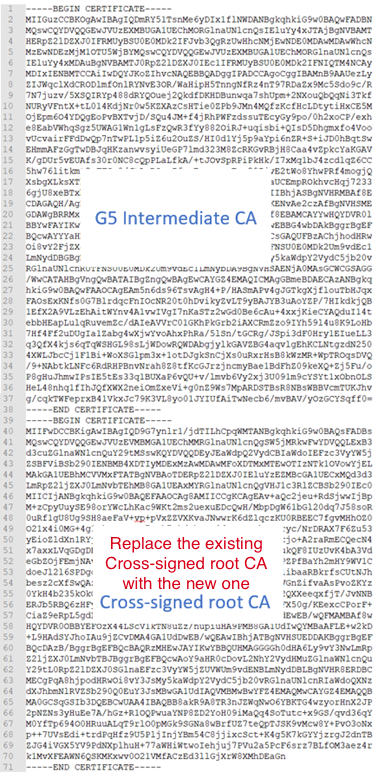
- Now, the certificate on your server will continue to be trusted if it can’t find its new G5 root in a needed trust store.
Additional resources
To learn more about other Google Chrome Root Program requirements and how DigiCert is meeting them, see Sunsetting the client authentication EKU from DigiCert public TLS certificates.
Need help?
If you have any questions or concerns, contact your account manager or DigiCert Support.
i
-

The most-trusted global provider of high-assurance TLS/SSL, PKI, IoT and signing solutions.
-



-
© 2022-2026, DigiCert, Inc. All rights reserved.
Cookie Settings
