
-
Centre d’apprentissage

 Précédent
Centre d’apprentissage
-
Ressources
Précédent
Ressources supplémentaires
-
Contactez-nous
Précédent
-
Langue
- Nous contacter



Base de Connaissances
Comment télécharger le client d'authentification SafeNet
Le client d'authentification SafeNet est un outil qui permet à votre machine de signature de communiquer avec le jeton matériel USB SafeNet sur lequel est installé votre certificat de signature de code ou de document.
Si ce logiciel n'est pas installé, votre système ne détectera pas votre certificat de signature de code ou de signature de documents.
- Trouvez la version du client d'authentification SafeNet nécessaire pour votre machine de signature et cliquez sur le lien correspondant.
- Cliquez sur « Save File » dans la fenêtre qui apparaît.
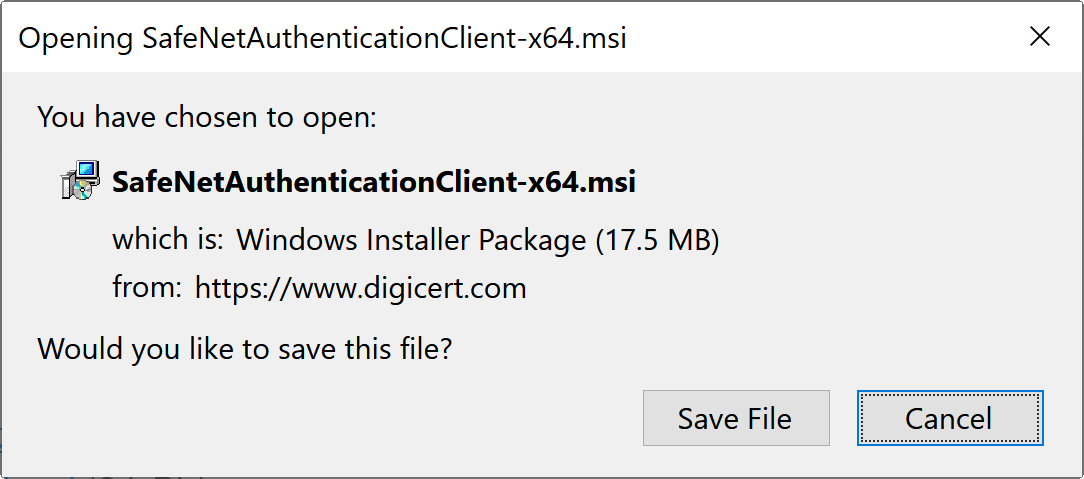
- Ouvrez le dossier contenant le fichier téléchargé et lancez le fichier d'installation.
- Suivez les instructions pour installer le client d'authentification SafeNet sur votre système.
TÉLÉCHARGEZ LA DERNIÈRE VERSION CI-DESSOUS:
Windows:
Client d'authentification SafeNet 10.9 R1 GA pour Windows
Supports:
- Windows 11
- Windows 10
- Windows Server 2022
- Windows Server 2019
- Windows Server 2016
- Windows Server 2012 R2
MacOS:
Client d'authentification SafeNet 10.9.2499 (GA) pour Mac
Supports:
- macOS 15 (Sequoia)
- macOS 14 (Sonoma)
- macOS 13.3.1 (a) (Ventura)
Linux:
Client d'authentification SafeNet 10.9 pour Linux (GA)
Supports:
- Red Hat 8.10 et 9.4
- CentOS 9
- Fedora 41
- Debian 12.8
- Ubuntu 22.04 et 24.04.1
TÉLÉCHARGEZ L'ANCIENNE VERSION CI-DESSOUS:
Windows:
Client d'authentification SafeNet v10.9 GA (32 bits et 64 bits)
Client d'authentification SafeNet v10.8 R6 (32 bits)
Client d'authentification SafeNet v10.8 R6 (64 bits)
Supports:
- Windows 11
- Windows 10
- Windows Server 2022
- Windows Server 2019
- Windows Server 2016
- Windows Server 2012 R2
Client d'authentification SafeNet v10.6 GA (32 bits)
Client d'authentification SafeNet v10.6 GA (64 bits)
Supports:
- Windows 10 - Jusqu'à Redstone 5 (1809)
- Windows Server 2016
- Windows Server 2012 / 2012 R2
MacOS:
Client d'authentification SafeNet 10.9 (GA) pour Mac
Supports:
- macOS 14 (Sonoma)
- macOS 13.3.1 (a) (Ventura)
- macOS 12.6.5 (Monterey)
Client d'authentification SafeNet v10.8 R2 GA
Supports:
- macOS Sonoma
- MacOS Ventura
- MacOS Monterey
Client d'authentification SafeNet v10.8.29.0
Supports:
- MacOS Big Sur
- macOS Catalina
Client d'authentification SafeNet v10.2.82.0
Supports:
- macOS Mojave
- macOS High Sierra
Client d'authentification SafeNet v10.0.26.0
Supports:
- macOS Sierra
- macOS El Capitan
Client d'authentification SafeNet v9.1.10.0
Supports:
- macOS Yosemite
- macOS Mavericks
Linux:
Client d'authentification SafeNet v10.8 R1 GA
Supports:
- CentOS 8 / 9
- Fedora 34 / 36 / 37
- Chapeau rouge 8/9
- Ubuntu 20.04 / 22.04
Client d'authentification SafeNet v10.8.28 GA
Supports:
- CentOS 8.3
- Fedora 34
- RedHat 8.3
- Ubuntu 20.04
Client d'authentification SafeNet v10.7 GA
Supports:
- CentOS 6.10 / 7.6
- Debian 9
- Fedora 30
- RedHat 7,6 / 8
- SUSE 15
- Ubuntu 18.04.2 LTS / 19.04
Client d'authentification SafeNet v10.0 après la mise en service générale
Supports:
- CentOS 6.9 / 7.3
- Debian 9.0
- Fedora 26
- RedHat 6.9 / 7.3
- SUSE 12.2
- Ubuntu 16.01 / 17.04
Pour en savoir plus:
Comment installer les pilotes et le logiciel client SafeNet (Windows)
Configurez votre jeton électronique matériel fourni par DigiCert
-

The most-trusted global provider of high-assurance TLS/SSL, PKI, IoT and signing solutions.
-



-
© 2022-2026, DigiCert, Inc. All rights reserved.
Cookie Settings
